The best OBD2 scanner for most Corvette owners is a reputable tool that reads generic emissions codes, freeze-frame data, readiness monitors, and live data—and whose current coverage chart explicitly supports the owner’s generation. For deeper C5, C6, or C7 work, a GM-enhanced scanner can access more modules and manufacturer-specific data. C8 diagnosis may require newer coverage, subscriptions, secure access, or professional equipment, so never assume that “works on all 1996+ cars” means complete Corvette access.
To place Best OBD2 Scanner for Corvette in a wider ownership and engineering context, continue with What Can a Corvette VIN Tell You?.
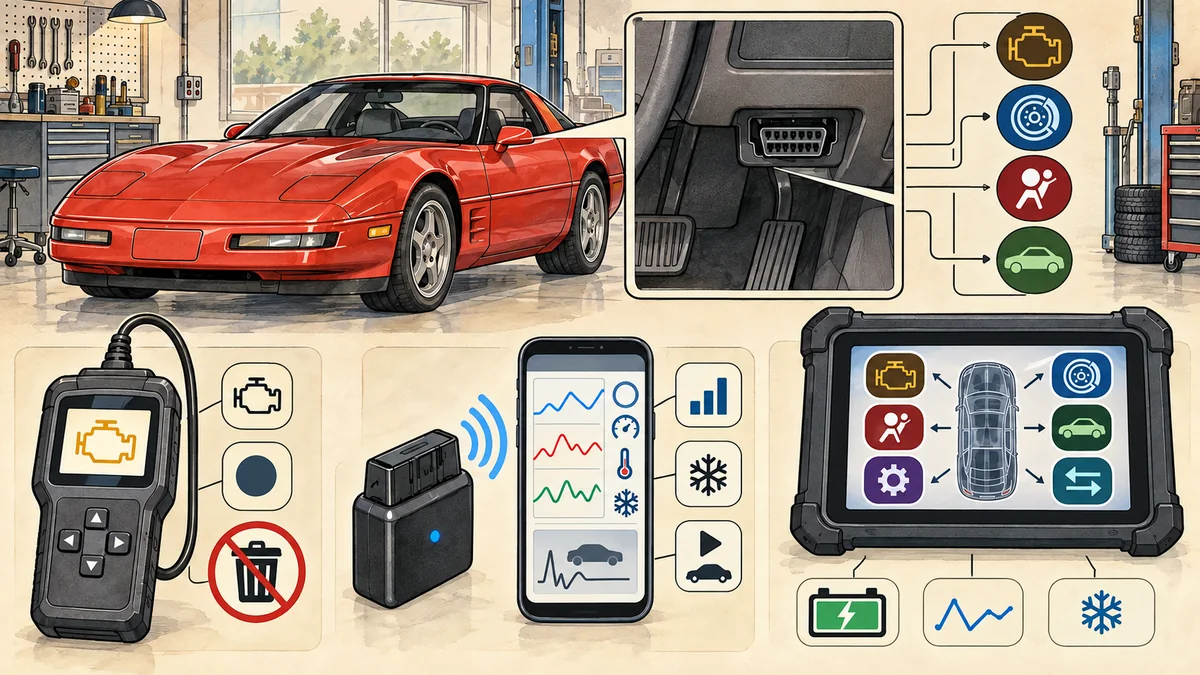
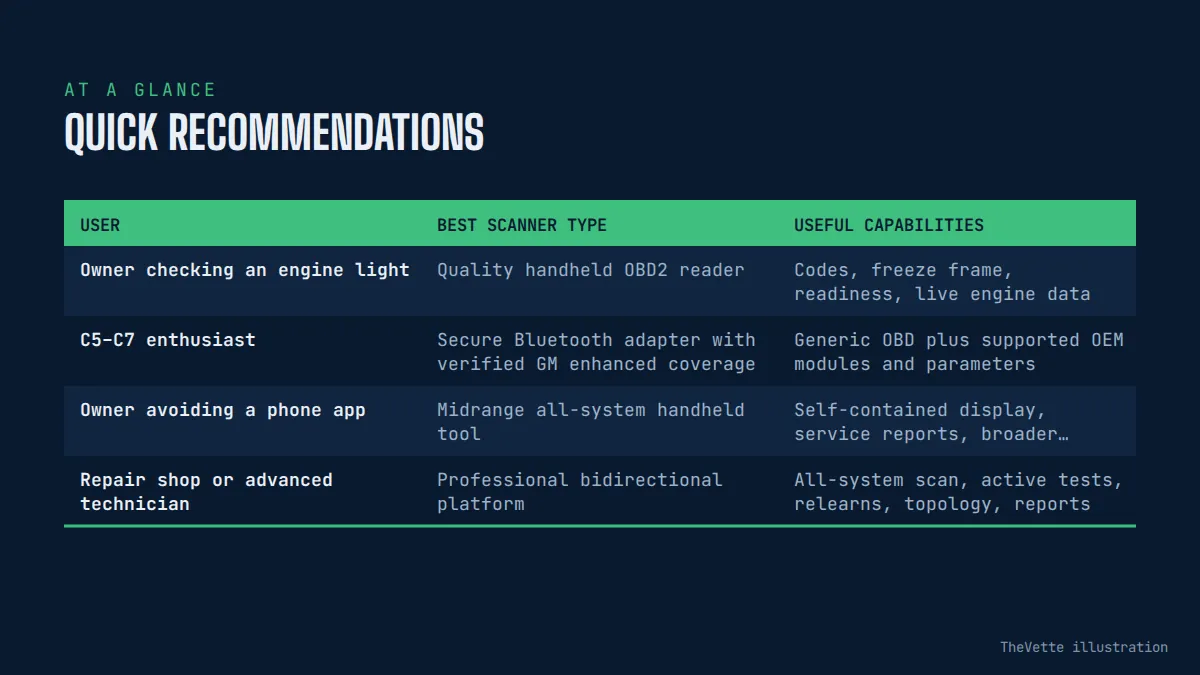
Quick recommendations
| User | Best scanner type | Useful capabilities | Important limit |
|---|---|---|---|
| Owner checking an engine light | Quality handheld OBD2 reader | Codes, freeze frame, readiness, live engine data | Usually emissions/powertrain focused |
| C5–C7 enthusiast | Secure Bluetooth adapter with verified GM enhanced coverage | Generic OBD plus supported OEM modules and parameters | Coverage varies by model year, module, app, and license |
| Owner avoiding a phone app | Midrange all-system handheld tool | Self-contained display, service reports, broader systems | Updates or subscriptions may cost extra |
| Repair shop or advanced technician | Professional bidirectional platform | All-system scan, active tests, relearns, topology, reports | Expensive and requires training and current coverage |
A scanner does not diagnose a car by itself. It collects evidence. A trouble code identifies the circuit or operating condition the module noticed; it does not automatically identify the part that should be replaced.
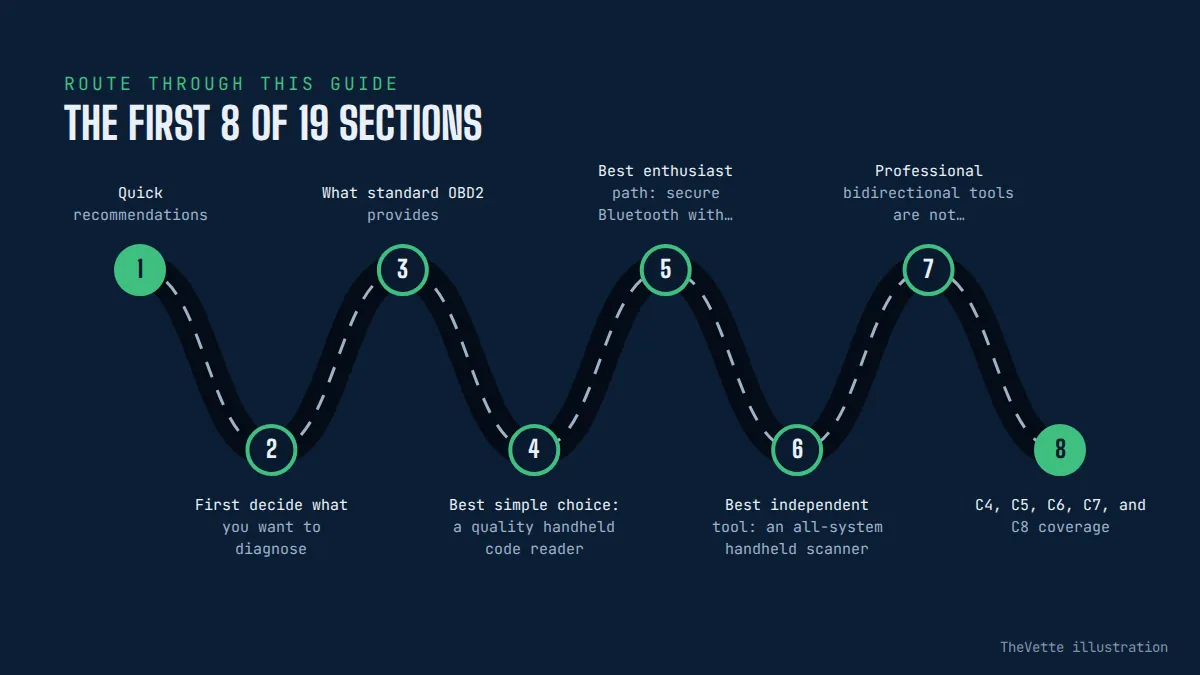
First decide what you want to diagnose
If the goal is checking a malfunction indicator lamp before an emissions inspection, a basic reader may be enough. If the concern is ABS, airbag, body electronics, suspension, climate control, transmission, or another non-emissions system, generic OBD2 access is often insufficient. The scanner must support the relevant module on the exact Corvette year.
Write down the car’s generation, model year, engine, transmission, trim, and problem. Then ask whether the tool can read codes, live data, and freeze-frame information from the specific module. “Full OBD2” normally describes legislated emissions functions, not every computer in the vehicle.
What standard OBD2 provides
EPA material describes OBD as the powertrain control module’s monitoring and fault-notification process for emissions and powertrain operation on 1996-and-newer vehicles. When a qualifying malfunction is detected, the system can illuminate the malfunction indicator lamp and store a diagnostic trouble code and operating conditions.
The standardized 16-pin data link connector gives compliant equipment a common path to emissions-related information. Useful generic functions include stored and pending codes, freeze-frame data, readiness monitors, vehicle information, and live parameters such as engine speed, coolant temperature, fuel trim, and oxygen-sensor data when supported.
This standardization is why an inexpensive reader can communicate with a 1996-and-newer Corvette at a basic level. It is not proof that the same device can reach ABS, selective ride control, body, roof, airbag, or other proprietary systems.
Best simple choice: a quality handheld code reader
A wired handheld reader is useful for owners who want fast engine-light information without pairing a phone. Choose one that displays code status, freeze frame, I/M readiness, live data, and battery or operating voltage. A clear screen and logical buttons matter more than a long list of vague “special functions.”
The cable should be flexible and long enough to view the device without stressing the connector. Updates should be available from the manufacturer’s real website. Check whether the tool stores or exports reports and whether it covers the earliest Corvette year you own.
Best for: reading emissions-related evidence and deciding whether a repair or professional diagnosis is needed. Not best for: assuming every warning light or chassis system is accessible.
Best enthusiast path: secure Bluetooth with GM-enhanced coverage
A Bluetooth adapter turns a compatible phone, tablet, or computer into the display. OBDLink’s current MX+ material provides a concrete example: it supports legislated OBD2 protocols, GM-related networks, generic and OEM-specific data add-ons, iOS, Android, and Windows, automatic sleep/wake behavior, and firmware updates.
Its published GM enhanced-coverage document includes Corvette from 1997 through 2019, but the maker also tells users to check whether OEM diagnostic trouble codes and parameters are supported for the specific vehicle. That makes it a strong example for C5–C7 research, not a blanket promise for every system or newer C8.
Advantages: portable hardware, graphing, logging, saved reports, and flexible app support. Trade-offs: phone compatibility, permissions, app quality, coverage details, and the temptation to leave an adapter connected indefinitely.
Best independent tool: an all-system handheld scanner
A self-contained all-system scanner can be easier for an owner who does not want diagnostic data on a personal phone. Look for an exact coverage database that lists Corvette by year and identifies engine, transmission, ABS, supplemental restraint, body, suspension, tire-pressure, and other supported modules individually.
Check what remains functional if an update subscription expires. Some tools continue using installed coverage; others restrict functions, cloud reports, or new vehicles. Read the terms before buying. A lower purchase price can become expensive when required updates, cables, or software are added.
Professional bidirectional tools are not automatically better for an owner
A professional platform may command actuators, run active tests, perform relearns, display network topology, and access service functions. Those capabilities can shorten diagnosis in trained hands. They can also move a component, alter a setting, or create a safety risk when used without the service procedure.
Bidirectional control is not a badge to collect. Buy it only when the exact Corvette functions are documented and the user understands the system. Programming and module replacement may require stable power, licensed software, secure access, an online account, and model-specific procedures beyond the scanner itself.
C4, C5, C6, C7, and C8 coverage
| Generation | Diagnostic buying concern |
|---|---|
| C4 | Only 1996 models fall under the normal US OBD2 starting point; earlier cars need generation-specific diagnostic methods |
| C5 | Generic OBD2 is available, while enhanced access must be verified by year and module |
| C6 | Broader electronic systems make ABS, body, suspension, and transmission coverage valuable |
| C7 | Confirm enhanced GM coverage, live parameters, service functions, and app/platform support |
| C8 | Require explicit current-year coverage; secure gateways, subscriptions, hybrid systems, and software changes may affect access |
An adapter whose PDF stops at 2019 should not be advertised as an enhanced C8 solution merely because it can read generic engine codes from newer cars. Check the manufacturer’s latest coverage data and contact its support team with the exact year and desired module.
Do not clear codes before recording the evidence
Clearing a code can turn off the warning lamp temporarily, erase freeze-frame information, and reset emissions readiness monitors. The underlying fault may remain. A car with incomplete monitors can fail or be rejected from an emissions inspection even when the light is off.
Before clearing anything, save a complete scan report, code status, freeze frame, monitor status, vehicle voltage, and relevant live data. Note the mileage, symptoms, weather, and operating conditions. Repair the cause, then follow the correct drive and verification procedure.
Never clear an airbag, brake, steering, hybrid, or other safety-related warning just to see whether it returns. Those systems require proper diagnosis and service information.
Readiness monitors matter for US inspections
Readiness monitors show whether the vehicle has completed self-tests since codes were cleared or power was lost. A “not ready” result does not by itself identify a failed component. It means the relevant monitor has not completed under the required conditions.
Do not use an internet drive cycle blindly. Requirements vary with calibration, temperature, fuel level, operating state, and fault status. Use the correct service information and local inspection rules. A scanner should show each monitor clearly without disguising incomplete status as a pass.
Live data is most useful when compared
A single sensor number rarely proves a failure. Compare cold start with warm operation, commanded values with actual values, left bank with right bank, and the symptom period with normal behavior. Record units and sample rate. Slow adapters can miss a brief event even when the graph looks smooth.
Useful engine data can include fuel trims, coolant temperature, intake-air temperature, manifold pressure, oxygen or air-fuel sensor behavior, throttle position, engine speed, and misfire information where supported. The diagnostic value comes from understanding the system and test conditions.
Battery voltage and communication problems
A scanner draws power from the diagnostic connector, and vehicle modules need adequate voltage to communicate reliably. EPA-hosted inspection procedures note that insufficient voltage at the connector can prevent communication. Low voltage can also create multiple misleading codes.
If a Corvette produces a long list of unrelated network faults after storage or a weak start, record the scan and test the 12-volt battery and charging system before condemning modules. The existing Corvette battery-discharge guide covers that investigation in more depth.
App privacy and account requirements
A phone-based scanner may collect the VIN, location-related trip data, driving behavior, device identifiers, or diagnostic reports depending on its features. Read the app’s current privacy policy and permissions. Disable trip logging or cloud sync when it is not needed, and do not upload a customer’s VIN or report without permission.
Buy adapters from an authorized source and install software from official app stores or the manufacturer. Extremely cheap cloned hardware may misrepresent firmware, security, protocol handling, or update support. A diagnostic port provides access to an important vehicle network, so hardware trust matters.
Leaving a Bluetooth adapter plugged in
Some reputable adapters publish a low-power sleep mode, but vehicle behavior and storage time still matter. A device that fails to sleep, wakes the network, or remains active during long storage can contribute to discharge. Remove the adapter when diagnosis is finished unless both vehicle and tool makers support continuous use.
Also consider physical clearance. An adapter protruding near the driver’s feet can be struck during entry or pedal use. Use an approved extension only when it does not interfere with controls and does not encourage permanent insecure installation.
What to compare before buying
| Feature | Evidence to require |
|---|---|
| Generic OBD2 | Codes, freeze frame, readiness, live data, and protocol support |
| GM enhanced access | Current Corvette year-and-module coverage chart |
| Platforms | Exact iOS, Android, Windows, or self-contained compatibility |
| Updates | Firmware source, software term, subscription cost, and post-expiry behavior |
| Reports | Save, export, and privacy controls |
| Power behavior | Sleep current, wake design, and maker guidance for connected storage |
| Support | Real documentation, warranty, and technical contact channel |
Three honest recommendations
For basic engine-light work: choose a name-brand handheld reader with freeze frame, readiness, and live data. For a C5–C7 enthusiast: a secure Bluetooth device with verified GM-enhanced coverage, such as the current MX+ category, offers useful logging and supported OEM access. Confirm the exact module before buying.
For C8 or all-system professional work: use a current platform whose coverage database explicitly names the model year and required systems. Ask about subscriptions, secure access, topology, active tests, and programming boundaries. When the job affects brakes, airbags, steering, immobilizer, or high voltage, professional service is the recommendation—not a cheaper adapter.
TheVette has no affiliate links in this article. Future commercial links must be disclosed and cannot replace coverage verification.
Safe scanning workflow
- Check battery condition and connector area before communication.
- Confirm the scanner and app support the exact year and desired module.
- Connect with ignition state set exactly as the instructions require.
- Run a complete scan before clearing or commanding anything.
- Save codes, status, freeze frame, readiness, voltage, and symptoms.
- Research the system and test the circuit rather than replacing the named part.
- Verify the repair and monitor completion using the correct procedure.
- Remove the tool after use unless continuous connection is documented as safe.
Keep cables away from pedals, steering, and moving parts. Do not scan while driving unless a passenger operates the device or data logging is configured before the car moves. A handheld screen is a distraction, not a dashboard.
Frequently asked questions
Will any OBD2 scanner work on a Corvette?
A compliant generic reader should access standard emissions functions on US-market 1996-and-newer cars, including 1996 C4 and later generations. Enhanced module access varies greatly, so verify the exact year and system.
Can a scanner tell me which part to replace?
Usually no. A code reports what the control module detected. Wiring, connectors, mechanical conditions, another sensor, software, or the named component can all contribute. Testing determines the cause.
Can I clear a check-engine light before inspection?
Clearing resets readiness monitors and may erase useful evidence. The car may still be rejected until monitors complete, and the fault can return. Diagnose and repair first.
Is Bluetooth safe for the battery?
Some quality adapters have documented sleep behavior, but any connected device can be relevant during long storage. Follow the maker’s guidance and remove it when finished unless continuous use is specifically appropriate.
Does an enhanced C7 tool automatically support C8?
No. A tool may provide generic C8 OBD2 while its OEM coverage ends at 2019. Require a current C8 year-and-module listing.
Final recommendation
Buy the least complicated scanner that fully supports the work you intend to do. A quality handheld reader is sufficient for basic engine-light evidence. A secure Bluetooth adapter with verified GM-enhanced coverage is the practical enthusiast choice for many C5–C7 owners. C8 and bidirectional work demand a current, explicit coverage check.
Whatever the hardware, save evidence before clearing, watch battery voltage, protect diagnostic data, and treat codes as clues rather than replacement instructions. The best Corvette scanner is the one whose documented coverage matches the exact car and whose owner uses it methodically.